


PRO How to get there. The card on Home on Mondays, the Monday notification, or Profile › Reports › Last week's report.
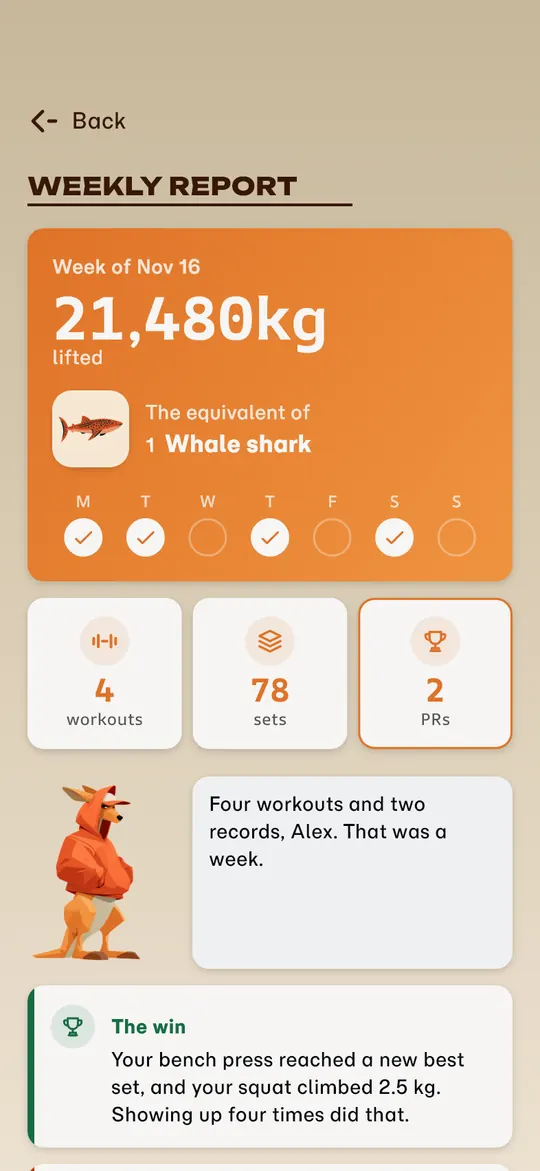
What's on it
- The week's card. The weight you lifted and the creature it equals, and Monday to Sunday with the days you trained ticked.
- Three tiles. Workouts, sets and PRs. Confetti if you set records.
- Gymaroo's take. A title, then three cards, the win (green), what to watch (red-orange) and the plan (orange).
- Tweaks for this week. Each a card with what it does, an ⓘ saying exactly what it changes, and a button to apply it. A new rep range for a stalled lift, one more set for a muscle that's short, a deload week, or your split's next 6-week block (which builds it and opens it).
A week without workouts gets no notification or card, just a short line from Gymaroo in Profile.